

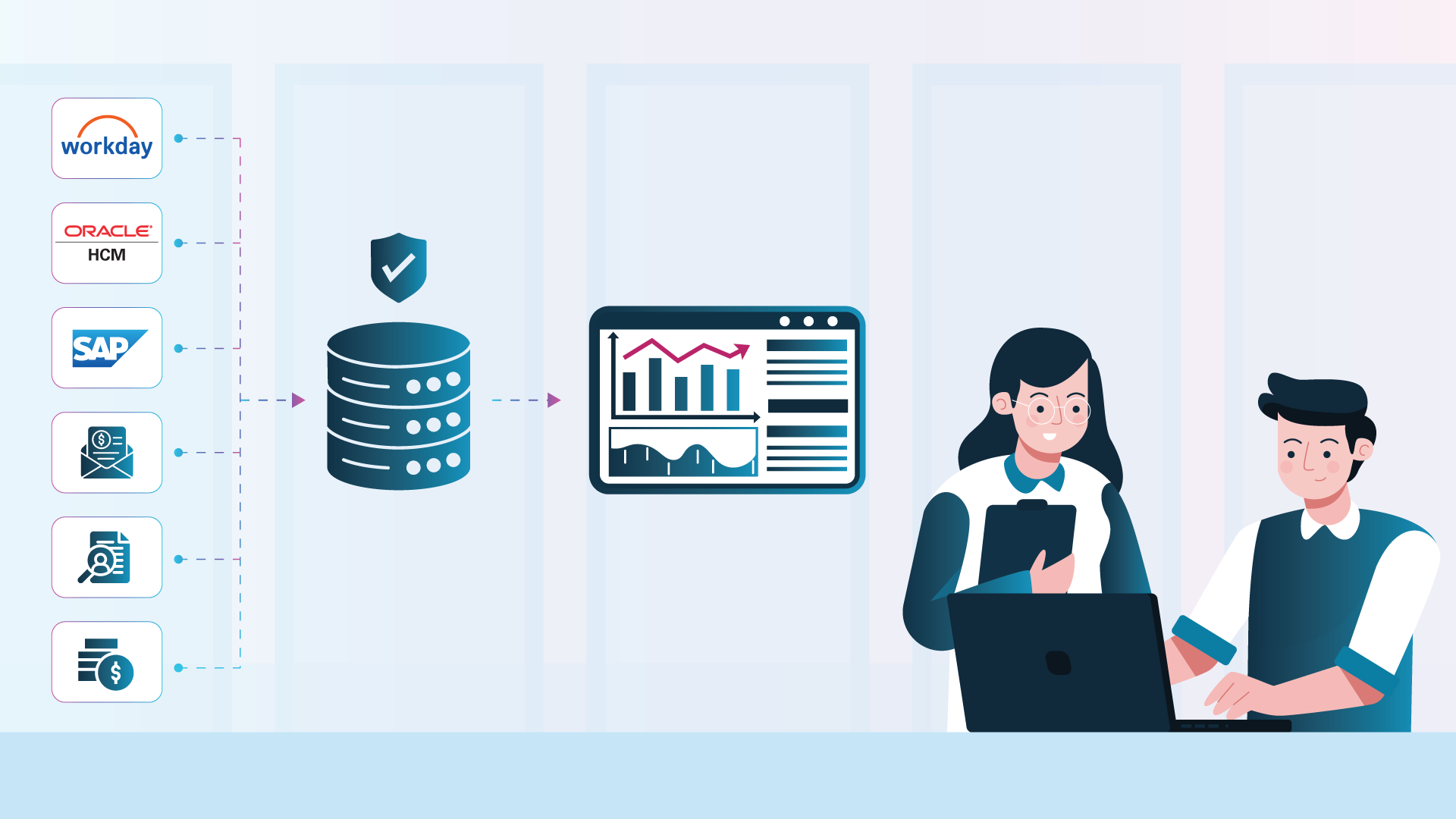
People analytics software brings workforce data from HCM, payroll, recruitment, Finance, engagement, and other systems into governed metrics, dashboards, forecasts, and analytical workflows. Organizations use it to understand headcount, turnover, hiring, compensation, labor cost, skills, diversity, performance, and future workforce requirements.
The best platform connects the systems an organization actually uses, applies trusted definitions, protects sensitive data, and delivers useful analysis without months of custom modeling.
What Is People Analytics Software?
People analytics software measures, explains, and forecasts workforce outcomes. It combines employee and business data so HR and Finance teams can answer questions that individual source systems cannot address alone.
For example, an HCM system may show current headcount, an applicant tracking system may show recruiting activity, and Finance may hold labor budgets. A people analytics platform can connect those sources to show whether hiring plans, workforce capacity, and labor costs remain aligned.
This is broader than producing an HR dashboard. Effective solutions establish consistent definitions, control access, preserve drill paths, and support repeatable analysis. CHROs, HR specialists, managers, analysts, and CFOs may need different views, but their underlying metrics should remain consistent.
What Should People Analytics Software Actually Do?
People analytics software should connect fragmented data, apply a governed model, and make approved insights accessible. Dashboards are useful only when the calculations and permissions behind them are dependable.
| Capability | What It Should Provide | Why It Matters |
|---|---|---|
| Data connectivity | Connections to HCM, payroll, ATS, engagement, and Finance | Enables cross-system analysis |
| Workforce data model | Relationships among employees, jobs, organizations, events, and costs | Reuses logic across reports |
| Metric library | Governed definitions for headcount, turnover, time to hire, absence, span of control, and labor cost | Gives teams a consistent way to calculate core measures |
| Pre-built dashboards | Role-specific views for executives, HR, managers, and analysts | Accelerates adoption |
| Cross-domain analysis | Workforce measures linked to financial or operational results | Shows business impact |
| Self-service analysis | Filters, drilldowns, report creation, and controlled exploration | Reduces dependence on IT |
| Predictive analytics | Models for risks, trends, forecasts, and scenarios | Supports forward planning |
| Conversational analytics | Natural-language questions grounded in governed data | Broadens access without bypassing control |
| Governance and security | Role-based controls, lineage, auditability, and ownership | Protects sensitive data |
These capabilities depend on one another. Predictive analysis needs complete history, while natural-language analysis needs approved definitions. The foundation comes before the interface.
People Analytics Software vs. HRIS Reporting, BI, and Workforce Planning
Adjacent categories overlap with people analytics software, but each starts from a different purpose.
| Category | Primary Purpose | Typical Strength | Common Limitation |
|---|---|---|---|
| Native HCM reporting | Report within one HCM ecosystem | Direct application access | Limited analysis when payroll, recruiting, or Finance sits elsewhere |
| Employee listening platform | Collect and analyze surveys and feedback | Sentiment, engagement, and experience analysis | Does not usually provide the full workforce and cost model |
| Workforce planning software | Model future headcount, skills, and costs | Scenarios and plans | May need another layer for historical analytics |
| General BI platform | Visualize enterprise data | Flexible, broad capability | HR models, metrics, and security may require custom development |
| People analytics platform | Analyze governed workforce data across systems | Pre-built HR content and workflows | Fit varies by connectors and configurability |
General BI can be part of the solution. The issue is how much workforce-specific engineering, validation, and maintenance the organization must supply. Native HCM reporting may still suit a team with one system and straightforward questions.
How Should You Compare People Analytics Platforms?
Compare platforms by how quickly they produce trusted insight, not sample dashboards. A polished demo does not prove that employee history, hierarchies, security, or turnover logic will work in production.
Evaluation Questions to Ask During Selection
| Evaluation Area | Questions to Ask During Selection |
|---|---|
| Source coverage | Are our exact HCM, payroll, ATS, engagement, and Finance systems supported? |
| Data history | Are effective-dated employee, job, manager, and organization changes preserved? |
| Metric governance | Can definitions be inspected, approved, changed, and versioned? |
| Cross-domain analysis | Can HR data be analyzed with labor budgets, financial actuals, revenue, or operational measures? |
| Deployment | What must be configured before the first validated dashboard? |
| Security | How are role, row, field, and geographic rules applied? |
| AI | Does AI use governed metrics and permissions, with a review path? |
| Adoption | Are experiences designed for executives, HR specialists, managers, analysts, and Finance users? |
| Extensibility | Can the team add custom data, metrics, models, alerts, and workflows without rebuilding the platform? |
The real implementation question is not how quickly a vendor can display a dashboard. It is how quickly your organization can trust what that dashboard says.
AI claims deserve the same scrutiny. The NIST AI Risk Management Framework emphasizes trustworthiness throughout the AI lifecycle. For people analytics, test permissions, definitions, sensitive-data handling, explainability, and human review.
People Analytics Software Platforms to Consider in 2026
There is no universal best platform. The right choice depends on the data estate, governance, deployment expectations, and users. This short list covers specialist platforms with public people analytics capabilities.
| Platform | Best Fit | Publicly Stated Source Coverage | Pre-Built Content | HR and Finance Analysis | Public Implementation Signal |
|---|---|---|---|---|---|
| SplashBI | Multi-system, pre-built workforce analytics | 100+ HCM connectors, including UKG, Workday, Oracle HCM, and SAP SuccessFactors | AI-assisted people analytics, 800+ KPIs; 30+ dashboards | Explicit HR and Finance models | 30+ dashboards in under four weeks |
| Visier | Large-enterprise analytics and benchmarks | Connectors, APIs, integrations, and data engineering | Thousands of AI-ready metrics | Business-impact analysis; validate Finance scope | Impact in months, not years |
| One Model | Configurable HR data foundation | Workday, SuccessFactors, Qualtrics, Greenhouse, Databricks, Finance, and more | Storyboards, forecasting, planning, and AI | Combines HR and Finance data | Standard duration not disclosed |
| Crunchr | Guided HR self-service | HR and business-data consolidation; Workday integration | Hundreds of metrics, dashboards, and AI assistant | Validate Finance depth | Customer example cites three months |
Public claims are a starting point. Request demonstrations using your own sources, definitions, security scenarios, and cross-domain questions.
SplashBI
SplashBI stands out for mixed application estates that need substantial pre-built content. Its offering combines 100+ HCM connectors, 800+ KPIs, 30+ dashboards, predictive analytics, security, and HR plus Finance analysis.
Security incorporates role-based access controls, SSO and identity management, encryption in transit and rest, full audit trails, and SOC 2 & GDPR compliant architecture.
SplashBI people analytics can be deployed on your private cloud or on-prem, depending on your data and security needs.
Visier
Visier is an established option for large organizations seeking broad analytics, benchmarking, predictions, governed metrics, and role-based experiences. Validate packaged content, source support, and the effort required for organization-specific metrics.
One Model
One Model emphasizes a flexible data foundation spanning HRIS, ATS, payroll, engagement, performance, and Finance. Consider it when model configurability is central, and request a quantified deployment scope for the sources you plan to connect.
Crunchr
Crunchr focuses on HR-led self-service through data consolidation, hundreds of pre-built metrics, dashboards, insights, and an AI assistant. Enterprises with complex Oracle, SAP, or Finance requirements should verify exact connector and cross-domain capabilities.
Why SplashBI Is Built for Multi-System Workforce Analytics
SplashBI Workforce Intelligence combines packaged workforce content, multi-system connectivity, cross-domain analysis, and governed AI.
Pre-built content without starting over
SplashBI documents more than 800 HR KPIs and 30+ dashboards covering workforce composition, turnover, recruiting, compensation, diversity, performance, and labor cost. It states that these dashboards can be deployed in under four weeks, then adapted.
That matters because implementation effort often hides inside metric workshops and dashboard construction. Pre-built content gives teams a tested starting structure while still allowing definitions, thresholds, hierarchies, and views to reflect the business.
Deployment focused on trusted results
More than 30 pre-built dashboards can be deployed in under four weeks. The objective is to shorten the path from source-system connection to validated workforce insight. Moreover, SplashBI’s people analytics solution can be deployed on the customer’s private cloud or on-premise, focused on their specific data residency and security needs.
Deployment still requires source mapping, metric validation, security configuration, testing, and stakeholder approval. Starting with pre-built connectors, workforce models, KPIs, and dashboards reduces the amount of custom development required at each stage.
Connectivity for the HCM estate you have
SplashBI documents more than 100 pre-built HCM connectors. Named systems include Oracle HCM Cloud and Fusion, Workday, SAP SuccessFactors, UKG, Ceridian Dayforce, iCIMS, and Cornerstone OnDemand. Custom pipelines and CSV ingestion can bring in additional sources.
Buyers should still test history, updates, source-specific fields, error handling, and security. The advantage is a shorter path to unifying systems that were not designed to report together.
Security and governance for sensitive workforce data
Workforce analytics can expose compensation, performance, absence, diversity, and other sensitive employee information. Access cannot be uniform across executives, HR teams, managers, analysts, and Finance users.
SplashBI supports role-based access controls, so workforce data and insights can be aligned with each user’s responsibilities. Centralized metrics and models also help teams apply consistent definitions for measures such as headcount, turnover, and labor cost across dashboards and audiences. Other security guardrails include SSO and identity management, encryption in transit and rest, full audit trails, and SOC 2 & GDPR compliant architecture.
HR and Finance in one analytical view
SplashBI connects headcount, hiring, compensation, and organizational data with labor budgets and financial results. Use cases include cost per FTE, workforce-plan variance, and staffing impact.
SplashBI reports that 25 to 30 percent of its customers use HR and Finance together. This cross-domain model can give the CHRO and CFO a shared basis for workforce planning instead of separate spreadsheets with competing definitions.
AI after the data foundation
SplashAI supports natural-language questions against governed enterprise data. Predictive and prescriptive capabilities can surface patterns and risks. The value comes from applying AI to established metrics, models, and permissions. SplashBI’s approach is to CONNECT workforce and financial data, UNLOCK it through governed metrics and models, and let teams ASK questions through SplashAI. This creates an AI BI Flywheel in which connected data supports analysis, questions generate new insight, and governed results inform the next decision. See how a semantic layer supports consistent enterprise reporting and why business analysts still govern AI-assisted analysis.
People Analytics Platform vs. a DIY Warehouse and BI Build
A custom warehouse and BI stack provides control but requires the organization to own ingestion, historical modeling, HR metrics, security, dashboards, testing, and maintenance.
The timeline below is illustrative, not a delivery guarantee. Actual timing depends on data quality, source access, scope, governance, and stakeholder availability.
| Period | Specialist People Analytics Platform | DIY Warehouse and BI Build |
|---|---|---|
| First 30 days | Connect priority sources, map core fields, validate standard metrics, configure security, and preview pre-built dashboards | Design architecture, secure access, profile source data, define requirements, and begin ingestion pipelines |
| Days 31 to 60 | Reconcile results, adapt definitions and hierarchies, train initial users, and release priority dashboards | Build historical employee models, create metric logic, establish security, and begin dashboard development |
| Days 61 to 90 | Expand audiences, add sources, configure alerts or predictions, and govern adoption | Validate metrics, revise models, test dashboards, document logic, and prepare an initial production release |
The platform route trades some architectural freedom for packaged speed. DIY offers deeper control but creates continuing development responsibility. Compare three-year staffing, maintenance, source changes, security testing, and governance, not only license cost.
A Final People Analytics Software Checklist
Before selecting a platform, confirm that it can:
- Connect the exact HCM, payroll, ATS, learning, engagement, and Finance systems in use
- Preserve effective-dated employee, job, manager, and organizational history
- Provide transparent, editable definitions for priority workforce metrics
- Combine HR and financial data without uncontrolled spreadsheet joins
- Apply role-based and row-level access to sensitive employee information
- Deliver useful pre-built dashboards while supporting organization-specific analysis
- Explain how predictive models and natural-language answers are governed and reviewed
- Demonstrate a credible implementation plan with named responsibilities on both sides
- Support adoption by executives, HR specialists, managers, analysts, and Finance teams
- Show how new sources, metric changes, and security updates will be maintained after launch
Choose for the Data Estate You Actually Have
The best people analytics software is the one that fits the organization’s systems, governance model, analytical questions, and capacity to maintain the solution. For enterprises that need pre-built workforce intelligence across Workday, Oracle HCM, SAP SuccessFactors, other HCM sources, and Finance, SplashBI People Analytics offers a particularly strong path from fragmented data to governed decisions.

The SplashBI Editorial team covers enterprise analytics, AI-driven decision-making, and the future of Finance and HR intelligence.
Frequently Asked Questions
What is people analytics software?
People analytics software connects workforce and related business data, applies consistent metric definitions, and delivers dashboards, analysis, forecasts, or decision support. It helps organizations understand topics such as headcount, turnover, hiring, compensation, labor cost, skills, performance, diversity, and workforce plans.
What is the difference between people analytics software and an HRIS?
An HRIS records and manages employee processes and transactions. People analytics software analyzes data from an HRIS and often combines it with payroll, recruiting, engagement, Finance, and operational sources. Some HCM suites include analytics, but a specialist platform is generally designed for broader cross-system analysis.
Which people analytics software works with Workday, Oracle HCM, and SAP SuccessFactors?
SplashBI publicly lists pre-built connectivity for Workday, Oracle HCM Cloud and Fusion, and SAP SuccessFactors among more than 100 HCM connectors. Other vendors may support these systems through connectors, APIs, files, or implementation services. Buyers should verify the exact modules, fields, history, update method, and security included.
How long does people analytics software take to implement?
Implementation can range from weeks to months depending on source access, data quality, metric customization, security, and rollout scope. SplashBI states that it can deliver more than 30 pre-built dashboards in under four weeks. Treat any timeline as a scope-dependent target and require a validation plan.
Can people analytics software combine HR and Finance data?
Yes, if the platform supports both domains and has a model that relates employees, positions, departments, cost centers, budgets, and financial results. This allows CHROs and CFOs to examine workforce plans, labor costs, cost per FTE, and business outcomes using shared definitions.