

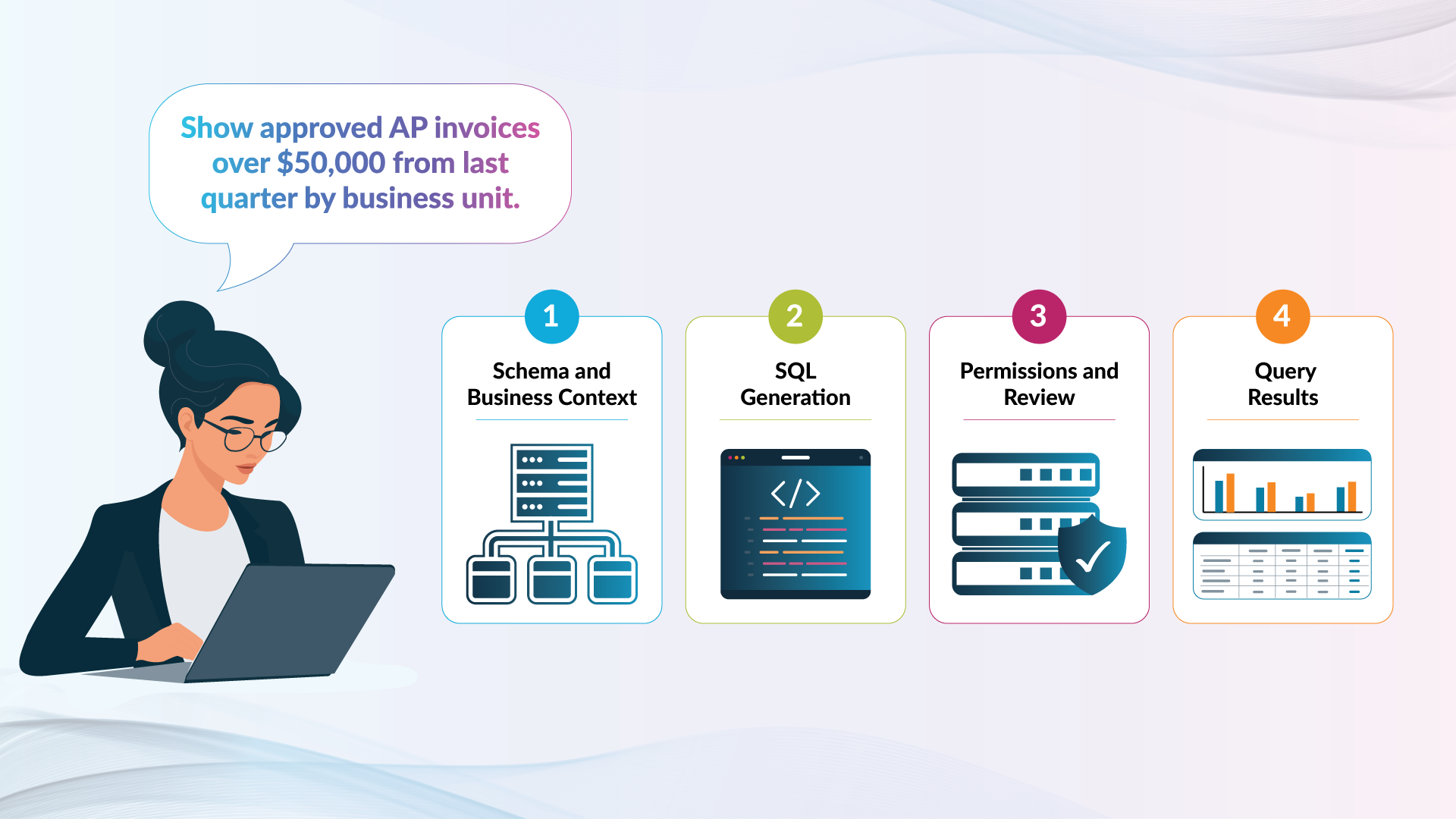
Text-to-SQL is an AI-assisted method for translating a question written in everyday language into a SQL query that a database can execute. In an enterprise environment, the query becomes governed only when schema context, permissions, validation, human review, execution controls, and auditability are applied around the generation process.
A user might ask, “Show approved AP invoices over $50,000 from last quarter by business unit.” Text-to-SQL can draft the required SELECT statement. The workflow must still resolve the business terms, find the correct data, respect access permissions, and support review.
What Is Text-to-SQL?
Text-to-SQL, sometimes called natural language to SQL or NL2SQL, converts a written question or instruction into Structured Query Language. The output is SQL code, not necessarily a finished analysis or verified answer.
The user might write:
List the ten suppliers with the highest approved invoice value last quarter.
The system identifies the entities and operations, then expresses them in the SQL dialect supported by the connected source.
Some tools return SQL for a person to inspect. Others can execute it and present a table, chart, or natural-language response. That execution choice is an important governance boundary.
How Does Text-to-SQL Work?
Text-to-SQL combines the request with information about the connected data environment. Its quality depends on linking business language to the right objects, relationships, and logic.
| Stage | What Happens | What Can Go Wrong |
|---|---|---|
| 1. Receive the request | Capture the question and available context | The request is vague |
| 2. Retrieve context | Identify relevant schemas, columns, relationships, and metadata | Unrelated objects are selected |
| 3. Resolve intent | Interpret metrics, filters, dates, and output | “Last quarter” is misunderstood |
| 4. Generate SQL | Construct SQL in the required dialect | Syntax or functions are invalid |
| 5. Validate | Check objects, syntax, query type, and policies | An executable logical error passes |
| 6. Review and refine | Let a user inspect or change the SQL | A wrong assumption is missed |
| 7. Execute and inspect | Run with authorized access and review the result | A plausible but incorrect result is accepted |
An illustrative query could look like this:
SELECT
  business_unit,
  COUNT(*) AS invoice_count,
  SUM(invoice_amount) AS total_invoice_amount
FROM ap_invoices
WHERE approval_status = 'APPROVED'
  AND approval_date >= :quarter_start
  AND approval_date < :quarter_end
  AND invoice_amount > 50000
GROUP BY business_unit
ORDER BY total_invoice_amount DESC;
This plausible SQL hides assumptions. Is approval_date correct? Are amounts stored in one currency? Does the table include canceled invoices? Is business_unit the approved hierarchy? The query must be checked against those questions, not only its syntax.
The Spider 2.0 benchmark illustrates the enterprise challenge with real-world workflows involving multiple dialects, extensive metadata, and schemas that can exceed 1,000 columns. Success on a simple demonstration database does not establish enterprise readiness.
What Makes a Text-to-SQL Query Governed?
A governed query is generated and used within defined controls for context, access, execution, review, and traceability. Governance is a property of the complete workflow, not a special form of SQL syntax.
| Control Area | What It Must Address |
|---|---|
| Context governance | Which schemas, metadata, definitions, examples, and relationships can inform generation |
| Access governance | Which databases, tables, and records the authenticated user may access |
| Query governance | Which statement types, functions, and data operations are permitted |
| Execution governance | Whether queries require review, where they may run, and which resource limits apply |
| Traceability | Who generated, changed, executed, saved, or shared a query and when |
These controls operate independently. A security check cannot correct a misunderstood metric, and a semantic definition cannot grant access to restricted records.
Execution needs explicit controls because an exploratory SELECT differs from a statement that changes data or structures. Microsoft, for example, separates read-only use from read-and-write execution requiring approval. Microsoft Learn
Why Can Valid SQL Still Produce the Wrong Answer?
A database can execute a query successfully even when the query does not represent the user’s intent. Technical validity and business correctness are separate tests.
| Test | Question It Answers | Example Failure |
|---|---|---|
| Syntax validity | Will the database accept it? | An unsupported function fails |
| Schema validity | Do the objects exist? | The model invents a column |
| Logical validity | Do joins, filters, and aggregations work? | A join duplicates invoice amounts |
| Semantic validity | Does it use the approved meaning? | Revenue omits required credits |
| Authorization | May this user access the data? | The request includes restricted payroll |
| Operational safety | Is it appropriate for this environment? | An unbounded query consumes excessive resources |
Errors can be difficult to detect because an incorrect join or date column may still produce a believable result. Missing currency logic may remain hidden until someone compares totals with a governed report.
Google recommends validating AI-generated SQL and lets users inspect, edit, refine, and compare queries before use. Google Cloud documentation
How Is Text-to-SQL Different From a Semantic Layer, Conversational Analytics, and a SQL IDE?
Text-to-SQL is the translation capability. The surrounding technologies supply business meaning, manage the user interaction, and provide the development and execution environment.
| Capability | Primary Role | Relationship to SQL |
|---|---|---|
| Text-to-SQL | Converts a natural-language request into SQL | Produces SQL directly |
| Semantic layer | Defines metrics, entities, relationships, and hierarchies | Guides SQL logic |
| Conversational analytics | Supports questions, answers, and follow-ups | May use text-to-SQL or analytical APIs |
| SQL IDE | Supports query development, review, and execution | Makes generated and manual SQL usable |
| Visual query builder | Lets users select objects, joins, and filters | Generates SQL from visual choices |
A semantic layer in enterprise reporting can supply approved metric definitions and entity relationships. It does not necessarily generate SQL or manage a conversation.
Conversational analytics is broader. It can retain context across follow-up questions and present explanations or visualizations, sometimes using text-to-SQL underneath.
Snowflake demonstrates this relationship by using semantic models to connect business terminology with database structures. Snowflake documentation
What Are the Main Text-to-SQL Use Cases?
Text-to-SQL is most useful as an accelerator for query development, exploration, and learning. The appropriate level of review depends on the user, the data, and the consequences of an incorrect query.
| Use Case | How Text-to-SQL Helps | Appropriate Control |
|---|---|---|
| Drafting a query | Produces starting SQL | Review tables, joins, and logic |
| Exploring a schema | Suggests relevant objects and patterns | Confirm objects in the schema browser |
| Refining SQL | Adds filters, grouping, or fields | Compare changes before execution |
| Explaining SQL | Describes structure and behavior | Check the explanation against the code |
| Troubleshooting | Suggests syntax or structural corrections | Test against known results |
| Supporting occasional users | Reduces blank-editor difficulty | Limit access and review high-impact work |
Text-to-SQL does not remove the value of SQL expertise. Developers can identify subtle errors and system-specific requirements. Other users still need enough data literacy to describe a question precisely and recognize when results require verification.
How Should Enterprises Evaluate Text-to-SQL?
An enterprise evaluation should test the complete workflow against real schemas, permissions, and business questions. A few successful prompts on sample data are not sufficient.
Ask whether the system can:
- Use the correct SQL dialect for each connected source
- Ground suggestions in relevant schemas and metadata
- Show the generated SQL before it runs
- Let users edit, refine, and reject suggestions
- Inherit or enforce established data permissions
- Restrict write operations or require approval
- Record queries, changes, and execution activity appropriately
- Keep development, test, and production environments clear
- Handle ambiguous language by requesting or enabling clarification
- Compare results with trusted reports or known test cases
Testing should include synonyms, fiscal calendars, currencies, complex joins, restricted tables, and incomplete prompts. A useful system must make uncertainty and errors manageable, not only perform well on easy questions.
How SplashAI Supports Text-to-SQL in SQL Connect
SplashAI in SQL Connect brings natural-language SQL generation into the same workspace where developers and analysts explore schemas, edit queries, execute SQL, and inspect results. The generated code remains visible and editable, so users can refine it before execution.
SplashAI supports four relevant AI-assisted development capabilities:
- Natural language to SQL
- SQL suggestions
- Query refinement
- Context-aware assistance
The SQL Connect workspace makes that assistance practical. Users can browse database objects, work in multiple query tabs, format SQL, manage sessions, and compare data grids across applications or environments.
SQL Connect supports table-level access controls by user profile, single sign-on, and audit reporting for table access or complete SQL statements. Git integration adds version history and collaboration for maintained scripts.
It provides a consistent workspace across supported sources including Oracle, Workday, Salesforce, Snowflake, MySQL, Jira, ServiceNow, SAP SuccessFactors, and ADP Workforce Now. Text-to-SQL must still follow each connected system’s structures and language requirements.
SplashAI accelerates the path from intent to a working query while keeping the SQL available for developer inspection and control. This aligns with the security, transparency, quality, and monitoring principles described in the SplashBI AI Policy.
From Natural Language to Controlled SQL
Text-to-SQL makes query development more accessible, but natural language is only the starting point. Reliable enterprise use depends on context, definitions, permissions, validation, review, and traceability. The goal is to reach useful SQL faster while preserving the visibility to understand, correct, and govern what will run.
Explore how SQL Connect combines AI-assisted development with a secure enterprise SQL workspace.

The SplashBI Editorial team covers enterprise analytics, AI-driven decision-making, and the future of Finance and HR intelligence.
Frequently Asked Questions
What is text-to-SQL in simple terms?
Text-to-SQL converts a question or instruction written in everyday language into a SQL query. For example, “Show monthly sales by region” can become a SELECT statement with the necessary fields, aggregation, and grouping. The generated query should still be reviewed against the intended business meaning.
Is text-to-SQL the same as conversational analytics?
No. Text-to-SQL translates language into SQL. Conversational analytics manages a broader interaction that may include follow-up questions, contextual answers, explanations, and visualizations. A conversational analytics product may use text-to-SQL, a semantic model, analytical APIs, or a combination of methods.
Does text-to-SQL require a semantic layer?
Not always. Basic text-to-SQL can work from database schemas and metadata. A semantic layer becomes valuable when questions depend on approved metrics, business terminology, hierarchies, or complex relationships that are not evident from technical object names alone.
Can text-to-SQL generate incorrect queries?
Yes. A generated query can contain invalid syntax, nonexistent objects, incorrect joins, missing filters, or misunderstood business logic. It can also execute successfully and still answer the wrong question. Review, testing, permissions, execution controls, and comparison with trusted results remain important.