
Self Service Business Intelligence – 10 Key Benefits to Know!

Self Service Business Intelligence – 10 Key Benefits to Know!

As business data volume is continually increasing, organizations must concentrate their efforts on maintaining the data and interpreting it. Business Intelligence (BI) is designed to help business leaders extract insights from past performance, predict coming events, and evade barriers even before they take place. BI used to be implemented only by big enterprises due to complexity, expenses and the experiences needed. Those complexities are long gone, Small and Medium Business (SMB) are the new notable BI buyers. To stay ahead of the competition, companies must make intelligent decisions based on reliable and consistent data. This is where BI comes to the fore!

What is Self-Service Business Intelligence?

Self-service business intelligence (SSBI) enables businesses to translate business data and present the data in the form of a report or chart without involving IT or BI teams. Self-service BI can help optimize your organization’s decision-making capacity by giving users a single source of truth within a business intelligence ecosystem. SSBI allows teams like product developers, finance, marketing, sales, and operations to answer data queries, with governance backed by IT and BI analysts. SSBI refers to the methods, tools, and software employed by organizations to enable business users to visualize and analyze data without advanced IT training.
Self Service Business Intelligence

Traditional BI vs. Self-Service BI – The Difference!

Traditional or Enterprise BI is less efficient in making better business decisions. It cannot handle large volumes of data and is almost unlikely to identify patterns in unstructured data tables. However, self-service BI does not have any such issues. Self-service BI is more about providing the business user the full power of the data to make better decisions. There is no requirement to reach the IT team and waiting for a long turnaround time for reports when one requires complete data. Self-Service BI gives business users with data and the tool needed to get the precise outcome they want. The business user can have accurate, up-to-date data at any time. The user can request data and dashboards from any device connected to the Internet. Traditional BI is based on aggregates, filters, disk space access, and has old architecture. It points to a very complicated and complex set of technologies required to maintain that old architecture. Traditional BI needs more people involved, and the whole process demands time to be implemented. All the data business users can reach by using self-service BI is clear. The tool itself is spontaneous and interactive, enables users to extend data sources without IT-created data source constraints.

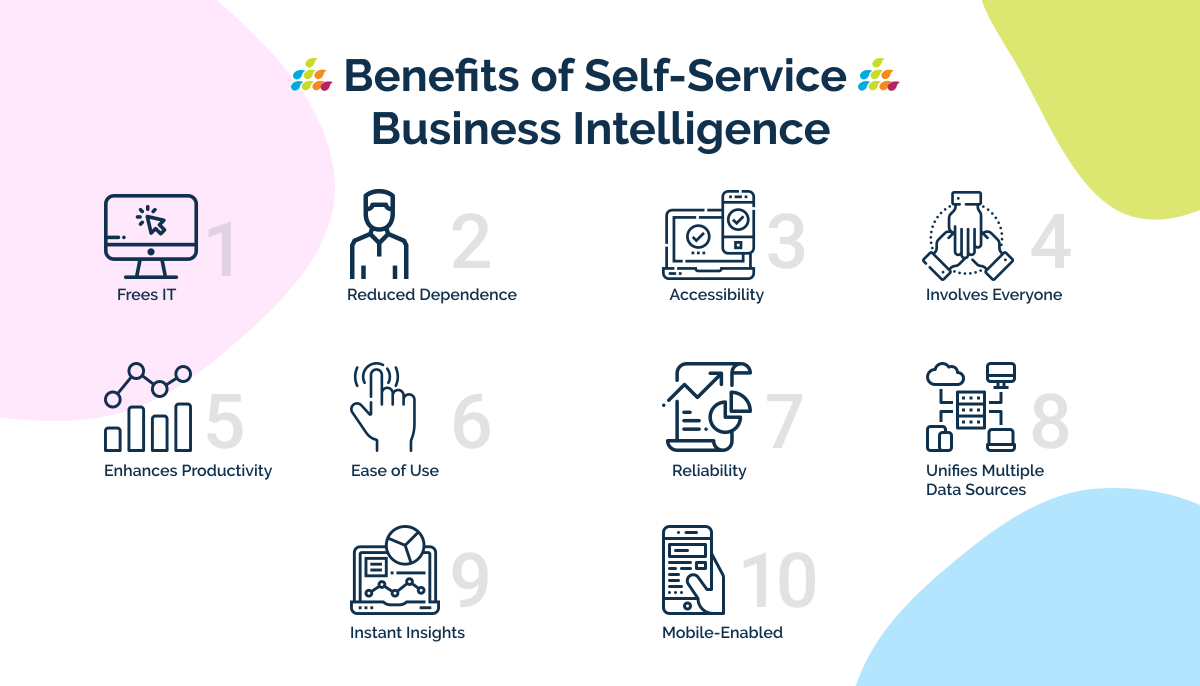
10 Benefits of Self-service Business Intelligence

1. Frees IT

Self-service business intelligence fills in the lack of trained analysts and gets data into the business users’ hands. Business users can then complete less intense tasks on their own. Therefore, it frees up IT, who can concentrate on more vital and core work than reporting.

2. Reduced Dependence

Self-service reporting enables business users to make data-driven decisions without relying on IT teams or data scientists. Self-service reporting tools help companies to put data at the core of their operations and decision-making.

3. Accessibility

Leads to democratization of the data by enabling the business users to use a decentralized database and application.

4. Involves Everyone

Self-service business intelligence empowers business users by involving them in the analysis process. With the vast amount of data produced every minute, it does not make much sense to limit the domain of analytics to a restricted set of people.

5. Enhances Productivity

With the distribution of tasks at hand and diversification of sources, it can help improve productivity. Business users and data experts can work together for better decisions.

6. Ease of Use

Self-service BI users do not have the technical abilities needed to work with a complicated system. Therefore, a self-service BI solution must be remarkably intuitive and user-friendly. It should allow customizable security controls for each user, restricting the user’s access to only the data related to their position.

7. Reliability

Given that most self-service business intelligence platforms do not have a thorough technical background, it is vital that they feel comfortable using the platform. When employees recognize they cannot randomly delete or lose data, they will quickly embrace it. As they keep working with it, their trust in their capability to make crucial decisions will improve.

8. Unifies Multiple Data Sources

Extensive business intelligence often demands merging multiple data sources and delivering cross-database queries. A user-friendly Self-service BI setup will allow you to aggregate and interpret every type of data available in one central place.

9. Instant Insights

Gone are the days of requesting a critical KPI and having to wait for the IT team to pull reports. Self-service BI puts the user in command of the data. Data can be obtained on the fly for real-time analysis and instantly actionable insights.

10. Mobile-Enabled

BI means having the correct data at the proper time to make the best calls. It means accessing data wherever you are, which requires the use of a mobile device. Self-service BI is mobile-enabled, allowing businesses to react to queries in real-time and instantly make the right decisions.

Some of the best Self-service BI tools have the following features:

  • Easy Drag-and-Drop Interface
  • Predefined Dashboard Templates
  • Easy to use Data Connectors
  • Various Reporting Options
  • AI-Enabled

Enters… SplashBI!

Executing a self-service BI solution is not as terrifying as it may appear if you approach an able provider. SplashBI, for example, has years of expertise in assisting companies in achieving success. Our out-of-the-box solution is devised with a visually excellent and user-friendly dashboard so you can start making data-driven decisions almost instantly. One of our AI-powered solutions’ key capabilities is generating reports and dashboards without the dependency on the highly skilled crew like data experts or IT personnel.

FAQ's

Analytical reports provide strategic insights into business trends and performance for decision-makers, while operational reports offer real-time data for day-to-day management. Analysts and managers typically rely on analytical reports, whereas operational staff and line managers use operational reports.
  • Operational Reporting focuses on real-time data to support immediate, day-to-day business operations and ERP reporting needs. It provides insights into current performance for operational staff and line managers.
  • Analytical Reporting provides strategic insights by analyzing historical data, trends, and complex cross-subject area information, often from data warehouses. It enables analysts, managers, and executives to understand underlying causes and make informed strategic decisions.
  • Operational reports are typically streamlined and pre-defined, though creating complex cross-subject area reports can be challenging with certain tools like OTBI, often requiring advanced technical skills.
  • Analytical reporting, often facilitated by tools that provide access to subject areas, empowers analysts and managers to create customized reports using drag-and-drop interfaces, significantly reducing the dependency on IT for custom development.
Self-service BI platforms transform analytical reporting by shifting the process from IT dependency to business user autonomy, enabling non-technical users to create custom, cross-departmental reports in near real-time, which is nearly impossible or highly complex using traditional, rigid reporting methods like BI Publisher or Oracle Transactional Business Intelligence (OTBI).
  • Empowerment vs. Dependency: Self-service BI provides non-technical business users (e.g., HR, Finance) with the autonomy to generate custom reports and insights independently, whereas traditional methods require reliance on IT staff and specialized technical skills (like custom SQL) for report creation and customization.
  • Cross-Functional Analysis: Self-service platforms facilitate the creation of complex, cross-subject area analytical reports (e.g., combining General Ledger and Payroll data), which is often highly complex, resource-intensive, or nearly impossible using many traditional, siloed reporting tools.
  • Time to Insight: Traditional reporting leads to delays and slow decisions due to the time-consuming and complex nature of data extraction and report customization, while self-service BI streamlines the process to enable near real-time decision-making and business growth.
  • Ease of Use: Modern platforms utilize intuitive, drag-and-drop approaches and reusable configurations, making it simple for analysts and managers to create reports, contrasting sharply with the rigid, complicated processes required by legacy systems.
  • Resource Allocation: By empowering users to handle routine reporting tasks, self-service BI significantly diminishes the need for specialized IT intervention, freeing up both IT and business teams to focus on core strategic functions.
To effectively generate customizable and hybrid analytical reports, a BI platform must offer self-service ad-hoc reporting, robust hybrid data integration (connecting cloud and on-premise sources), and a metadata layer that enables users to create reports for insight-led decision-making rather than just daily operational tracking.
  • Hybrid Data Connectivity: The platform must seamlessly connect disparate data sources, including traditional on-premise systems and modern cloud applications (e.g., Oracle Fusion Cloud, Workday, Salesforce), to provide a unified view for comprehensive analysis.
  • Self-Service Ad-Hoc Reporting: Essential for analytical reporting, this feature allows non-technical business users to easily modify, filter, drill-down into, and create reports on demand for specific, high-level business questions (e.g., trend analysis, forecasting).
  • Customization and Flexibility: The solution must overcome the limitations of rigid, out-of-the-box reports, allowing users to define custom calculations, change report layouts, and blend diverse data sets to match unique business needs.
  • Integrated Operational & Analytical Data: The platform needs the architectural capability to support both high-volume transactional (operational) data and summarized, historical (analytical) data within a single, integrated reporting environment for rich context and validation.
Self-service drill-down analysis empowers non-technical business users by enabling them to independently generate custom reports and insights, reducing their reliance on IT departments. This democratization of data analytics fosters a culture of proactive decision-making and allows users to explore data at a granular transaction level.
  • Empowers non-technical users by allowing them to create and manipulate data sets with ease, diminishing the need for specialized IT intervention in routine reporting tasks.
  • Fosters a culture of proactive decision-making by enabling organizations to respond swiftly to changing business needs.
  • Allows for detailed transaction-level analyses to uncover trends, patterns, and potential areas for improvement, leading to more accurate and reliable reporting.
Real-time dashboards significantly enhance cross-functional collaboration in multinational retail by providing a unified, up-to-the-minute view of key performance indicators across all departments and regions. This shared visibility allows different teams, such as merchandising, marketing, and operations, to make faster, data-driven decisions in unison, aligning strategies and responding effectively to dynamic market conditions.
  • Real-time dashboards break down data silos by presenting a single source of truth accessible to all relevant departments (e.g., sales, inventory, marketing, logistics).
  • They enable a shared understanding of current performance, facilitating synchronized decision-making and coordinated actions across geographically dispersed teams.
  • By highlighting key metrics and trends instantly, these dashboards empower teams to proactively identify challenges and opportunities, fostering a more agile and responsive organizational culture.
  • The immediate availability of accurate data supports quicker problem-solving and strategic adjustments, crucial for navigating the complexities of the multinational retail landscape.
Automated HR metrics dashboards save HR teams significant time and enhance data accuracy by streamlining reporting processes and providing real-time insights. This allows for quicker, more informed decision-making.
  • Automated reporting eliminates manual data compilation, freeing up HR teams' time for strategic initiatives.
  • Real-time dashboards provide up-to-the-minute data, reducing the risk of errors associated with manual data entry and outdated information.
  • Pre-built, interactive dashboards tailored for HR metrics offer immediate operational insights, accelerating the time to value and enabling agile responses to workforce dynamics.
  • Visualizations simplify complex data into actionable insights, empowering HR professionals to make data-driven decisions with confidence.

Table of Contents

SplashBI at UKOUG 2025 – November 30th-December 2nd, 2025 | The Eastside Rooms, Birmingham